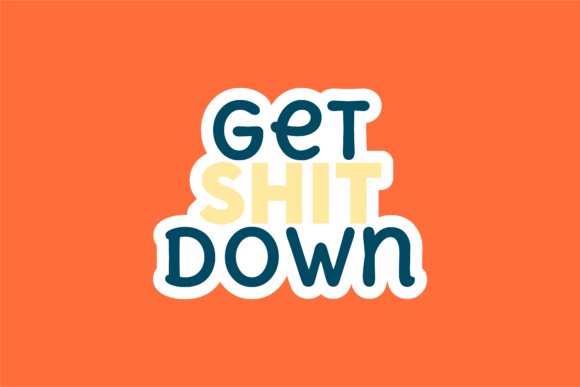
Get Shit Down: Bold, Ready-to-Use Sticker Design
“Get Shit Down” isn’t just a phrase—it’s a mindset. And in this case, it’s also a versatile, high-resolution sticker design built for real-world use. Whether you’re launching a new side hustle, prepping classroom materials, or personalizing your laptop for back-to-school season, this design delivers clarity, attitude, and practical flexibility—all in one package.
What You Actually Get (No Surprises)
You receive six production-ready files—each serving a distinct purpose—on a consistent 1920px × 1280px canvas:
- 1 AI file: Edit layers, fonts, and vectors directly in Adobe Illustrator—ideal if you’re refining colors, swapping typefaces, or integrating into larger branding projects.
- 1 EPS file: Widely compatible with older design software and print workflows, especially useful for local print shops or vector-based layout tools.
- 1 SVG file: Perfect for web use—embed directly into HTML, scale without blur on any screen size, or animate with CSS/JavaScript.
- 1 DXF file: Ready for CNC cutting, vinyl plotters, or laser engravers—creators using Cricut, Silhouette, or Glowforge will appreciate the precision.
- 1 JPG file: High-quality raster preview—great for quick mockups, social media posts, or sharing with clients who don’t need editable assets.
- 1 PNG file: Transparent background, crisp edges—drop it straight into presentations, Canva designs, or digital signage without extra cleanup.
No subscriptions. No watermarks. No hidden fees. Just clean, organized files you own and control.
For Educators & Students
A teacher building a “Back to School” bulletin board might use the PNG to drag-and-drop into a Google Slides template—no design skills needed. A college student organizing study groups could paste the SVG into Notion or Obsidian for visual motivation. The emphasis here is on speed, clarity, and low-friction integration. You’re not designing from scratch—you’re reinforcing focus, routine, and intention. The bold typography works at a glance, even on a projector screen or printed handout.
For Freelancers & Small Business Owners
If you run a small creative studio or manage social content for a local business, time is your most constrained resource. You might grab the AI file to tweak the slogan for a client campaign (“Get *This* Done”), then export fresh versions for Instagram Stories (JPG), email headers (PNG), and custom merch mockups (SVG). The DXF opens doors to physical products—think branded stickers for swag bags or packaging seals. Here, flexibility and commercial reuse rights matter more than flashy effects.
For Hobbyists & Makers
Whether you’re cutting vinyl decals for your hydro flask or layering elements in a Procreate sketch, the DXF and SVG files give you precise control. You don’t need to trace or redraw—the shapes are already optimized. That means less trial-and-error when aligning cuts or scaling across different materials. For someone learning vector basics, opening the AI or EPS file offers a quiet lesson in layer structure and anchor point placement—no tutorial required.
For Marketers & Content Creators
Consistency builds recognition. If your brand voice leans confident, grounded, and action-oriented, “Get Shit Down” fits naturally alongside mission-driven captions or productivity-focused newsletters. Use the JPG for a blog header, the PNG for a Pinterest pin overlay, or the SVG as an animated loading icon in a webinar slide deck. What stands out isn’t just the phrase—it’s how cleanly it translates across formats without distortion or manual fixes.
How to Know If It Fits Your Needs
Ask yourself a few quiet questions—not about what’s trendy, but what’s true for your workflow:
- Do you regularly switch between digital and physical outputs? → The DXF + SVG + PNG combo covers both reliably.
- Are you often handing assets to others (printers, developers, clients)? → EPS and AI ensure broad compatibility without follow-up requests.
- Do you value clean starting points over fully polished templates? → This isn’t a themed suite—it’s a focused, adaptable core element you build around.
- Is your goal to communicate urgency, ownership, or forward motion—not irony or detachment? → The design supports that tone without leaning into cliché.
It won’t replace a full brand system. It won’t generate copy for you. But if you’ve ever spent 20 minutes trying to match font weight across three platforms—or lost resolution when scaling a JPEG for a large-format poster—this set quietly solves those micro-frustrations.
Practical Uses You Might Not Expect
• A therapist printing tear-off reminder cards for clients: “Get Shit Down” becomes a gentle nudge toward agency—not pressure. The JPG prints cleanly on matte cardstock.
• A nonprofit coordinating volunteer sign-ups: The SVG animates smoothly in a micro-landing page, reinforcing momentum during registration.
• A developer documenting a CLI tool: They drop the PNG into a README.md as a visual anchor—humanizing technical docs.
• A podcast host adding branded bumper graphics: The transparent PNG layers cleanly over audio waveform visuals in CapCut or Descript.
None of these require advanced skills. All rely on having the right format, at the right size, with no guesswork.
Final Thought: Tools Should Serve Intent, Not Demand Attention
Design assets work best when they disappear into your process—supporting your message instead of competing with it. “Get Shit Down” does exactly that: it’s legible, scalable, format-diverse, and tonally cohesive. It doesn’t shout. It states. And because it arrives ready-to-use—not locked behind logins or usage limits—it respects your time, your goals, and your autonomy.
If your next project needs a visual shorthand for action, clarity, or grounded confidence—and you’d rather spend energy on execution than asset prep—this set meets you where you are.