Back to Virtual School Retro Design: A Creative Digital Resource for Educators and Crafters
As remote learning continues to evolve—and even thrive—alongside hybrid and in-person instruction, educators, parents, and digital creators are seeking fresh, engaging ways to celebrate the “back to school” season. Enter the Back to Virtual School Retro Design: a vibrant, nostalgic, and highly functional digital asset crafted for modern educational and creative needs. Unlike traditional classroom decorations or printed posters, this design is built for flexibility, precision, and instant usability—delivered as a digital download only, with no physical product included.
What Exactly Is a “Back to Virtual School Retro Design”?
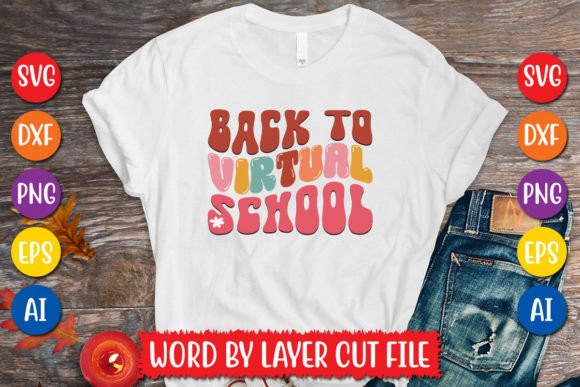
At its core, the Back to Virtual School Retro Design is a stylized digital illustration that blends 1980s–1990s visual nostalgia—think bold fonts, pixel-inspired accents, rainbow gradients, and retro tech motifs—with contemporary educational themes. It features the phrase “Back to Virtual School” arranged word-by-layer, meaning each word (or sometimes each letter) is isolated on its own vector layer. This intentional layering makes it ideal for cutting machines, graphic editing, and custom adaptation.
Retro design isn’t just about aesthetics—it’s about emotional resonance. For many adults guiding students through virtual classrooms, these visual cues evoke memories of early computer labs, dial-up internet sounds, and the excitement of first logging into an online platform. That sense of familiarity and optimism translates powerfully into motivational classroom banners, Zoom backgrounds, printable planners, and student welcome kits.
What You’ll Receive in Your Digital Download
Your purchase includes a single, well-organized .zip file containing six professionally prepared file formats—each serving a distinct purpose:
- 1 AI File – The native Adobe Illustrator source file. Fully editable: change colors, resize without loss, adjust text, or reposition layers with full vector fidelity.
- 1 SVG File – A word-by-layer SVG cut file optimized for Cricut Design Space, Silhouette Studio, and other cutting software. Each word appears on its own layer, enabling precise control over cutting order, color assignment, and material selection.
- 1 PNG File – High-resolution (300 DPI) with transparent background. Perfect for digital use: Google Slides templates, Canva presentations, LMS announcements, or social media graphics.
- 1 EPS File – An industry-standard editable vector format compatible with Illustrator, CorelDRAW, and Inkscape. Ideal for professional print vendors or advanced designers needing scalable, resolution-independent assets.
- 1 DXF File – Universally supported by CAD programs and many laser cutters. Especially useful for makers, educators using CNC tools, or STEM integration projects.
- 1 JPEG File – A high-quality, flattened preview image—great for quick reference, mockups, or sharing with collaborators who don’t need editing capability.
All files are pre-tested for compatibility with major platforms: Cricut, Silhouette, Inkscape, Adobe Photoshop, Adobe Illustrator, and more. No font substitutions or missing elements—you get what you see, ready to use.
Why Layered SVG Files Matter (and Why “Word-by-Layer” Is a Game-Changer)
You might wonder: why not just download a flat PNG and call it done? Because layering unlocks creative control. With a word-by-layer SVG, you can:
- Customize by student or subject — Hide “Virtual” and keep “Back to School” for hybrid settings, or isolate “School” to pair with science-themed icons.
- Match brand colors instantly — Change the hue of “Back” to match your school’s blue, while keeping “Virtual” in neon green for contrast.
- Adapt for accessibility — Increase spacing between words, add tactile textures to specific layers, or convert individual words into braille-ready outlines.
- Create animated reveals — Import layers into PowerPoint or Keynote and animate each word to appear sequentially during a welcome video.
This level of modularity simply isn’t possible with flattened raster images—and it’s what separates beginner-friendly resources from truly future-proof design assets.
Real-World Uses Across Education and Creativity
The versatility of the Back to Virtual School Retro Design extends far beyond bulletin boards. Here’s how real users apply it today:
Educators & Instructional Designers
Teachers embed the PNG into digital welcome packets for new families. They import the SVG into Canva to build interactive “first-week-of-class” scavenger hunts. Some even project layered versions onto classroom walls using a document camera—then invite students to physically rearrange magnetic word cards matching each layer.
Homeschool Families
Parents use the Cricut-compatible SVG to cut vinyl decals for laptop lids, water bottles, and study space signage. One homeschool co-op turned the design into reusable laminated flashcards—each word on a different color card, used for spelling drills and vocabulary games.
Small Business Owners & Content Creators
Educational entrepreneurs feature the design in digital course launch bundles. Etsy sellers combine it with editable lesson plan templates. Social media managers for edtech brands use the transparent PNG as overlay graphics in Reels announcing new virtual workshops.
Clarifying Common Misconceptions
Before downloading, it helps to clarify what this product is not:
- It is NOT a physical item. There’s no shipping, no waiting, no inventory—just immediate access after purchase.
- It does NOT include fonts or stock photos. All text is converted to outlines; no external font installation is needed.
- It is NOT licensed for resale as-is. While you may use it freely in your classroom, business, or personal projects, redistribution of the original files (even unmodified) violates standard commercial use terms.
- It does NOT require expensive software. Free tools like Inkscape or Cricut Design Space handle the SVG and PNG files perfectly—even on Chromebooks or tablets.
Fitting Into Today’s Digital Learning Landscape
In an era where screen fatigue is real—but digital engagement is non-negotiable—the Back to Virtual School Retro Design bridges fun and function. It acknowledges the legitimacy of virtual learning not as a stopgap, but as a dynamic, creative, and enduring part of education. Its retro styling doesn’t romanticize the past; instead, it invites warmth, playfulness, and intentionality into digital spaces often criticized for feeling sterile or impersonal.
Moreover, its technical readiness supports equity in creation. Whether you’re a seasoned graphic designer or a teacher opening Canva for the first time, the layered structure lowers barriers to customization—no coding, no complex plugins, no steep learning curve.
Getting Started Is Simple
After downloading your .zip file:
- Unzip the folder on your computer or tablet.
- Open the SVG in Cricut Design Space (for cutting) or the PNG in Canva (for digital slides).
- Use the AI or EPS file if you need to scale infinitely for large-format printing—or tweak spacing for readability on low-bandwidth devices.
- Experiment! Try recoloring one word, adding a subtle shadow to “Virtual,” or pairing “School” with a graduation cap icon from your existing library.
No tutorials required—but if you’d like inspiration, many creators share free YouTube walkthroughs using exactly this file type for back-to-school prep. Search “retro virtual school SVG tutorial” to discover dozens of beginner-friendly ideas.
A Thoughtful Tool for Meaningful Moments
Design choices matter—especially in education. A well-crafted, accessible, and joyful visual like the Back to Virtual School Retro Design does more than decorate a screen or wall. It signals care. It honors effort. It turns routine transitions—like returning to class—into shared, memorable experiences.
Whether you’re welcoming third graders to their first Zoom circle, launching a professional development cohort for teachers, or crafting a heartfelt note to your child’s virtual homeroom, this digital resource meets you where you are: technically capable, creatively curious, and deeply committed to making learning feel human—even from behind the screen.